
↯
01
Real-Time Adjustments
Change display settings whenever your viewing needs shift. Updates appear smoothly while you keep working.
Designed for everyday screen comfort
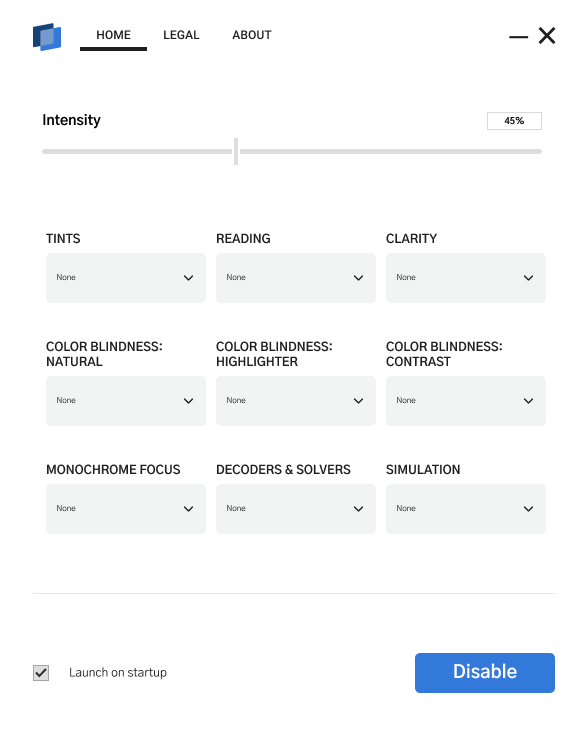
True View Manager gives you fast, intuitive control over how your desktop looks - so every task feels clearer, calmer, and more comfortable.
Core features
Everything is designed to help you reach a comfortable display setup quickly, without complicated menus or distracting workflows.
Change display settings whenever your viewing needs shift. Updates appear smoothly while you keep working.
Clean labels and intuitive controls keep every essential setting close at hand.
Improve visibility and tune your screen for greater comfort during work, browsing, and everyday use.
How it works
True View Manager stays available without getting in your way, applying your preferred visual settings as you work.
Find the controls you need in one focused, easy-to-read space.
Move the controls and see the result immediately on your desktop.
Your choices stay active in the background for a consistent experience.
Comfort throughout the day
From focused work to casual browsing, a few thoughtful adjustments can make your whole desktop feel more natural.
Questions, answered
Quick details about creating a more personalized screen with True View Manager.
It applies customizable display enhancements that help improve visibility, clarity, and overall screen comfort.
Yes. Adjustments appear in real time, letting you refine the view without interrupting your work.
Yes. It quietly maintains your preferred settings while you continue using your computer.
Yes. The interface is designed around clear labels and straightforward controls for fast adjustments.
True View Manager
Set up a clearer, more comfortable desktop experience in just a few simple adjustments.