
Screen Magnifier
Zoom into any area to make text, controls and fine details easier to inspect.
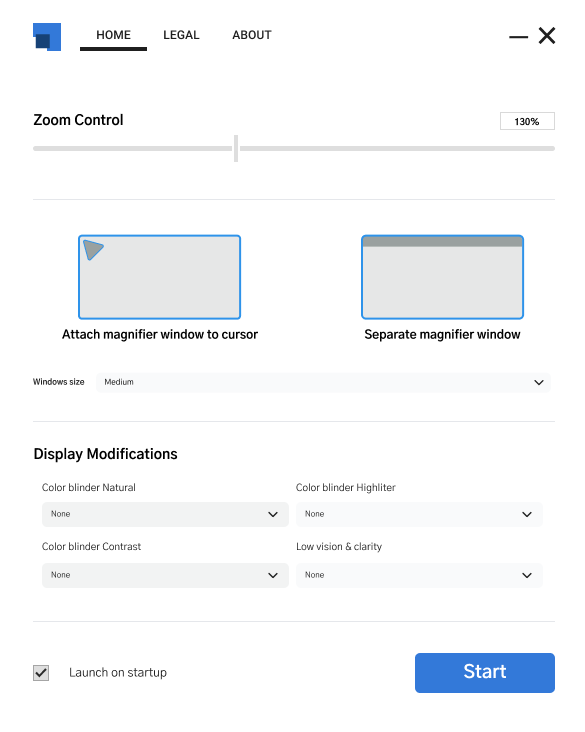
Visual assistance shaped around you
Magnify details, refine contrast and make colors easier to distinguish - all in real time, without interrupting what you are doing.
Made for clearer viewing
Vision Assist Pro brings essential visibility controls into one calm, approachable interface. Fine-tune your screen for the task, lighting and level of detail in front of you.
Zoom into any area to make text, controls and fine details easier to inspect.
Refine contrast, brightness, highlights and clarity until your screen feels right.
Enhance or adjust colors so important elements are easier to tell apart.
See every change immediately and fine-tune settings as your needs shift.
Clear labels, logical groups and quick access keep controls simple when you need a fast adjustment.
How it works
Vision Assist Pro stays available in the background and applies your visual preferences smoothly across your workflow.
Access focused visual tools without leaving the work in front of you.
Choose magnification, contrast, clarity, brightness and color settings.
Changes appear in real time and stay out of the way while you read, browse or create.
Everyday impact
Small visual barriers can add up across a day. A clearer, more adaptable screen can make everyday computer use feel less demanding.
Make content easier to inspect instead of leaning closer or repeatedly re-reading.
Bring text, controls and details into a view that better matches your needs.
Recognize screen elements and distinguish colors with greater certainty.
Questions
Quick answers about how Vision Assist Pro supports a clearer screen experience.
It is designed for people who want greater screen clarity, including users with low vision or color-vision differences.
Yes. Magnification and visual adjustments are applied in real time so you can refine them as you work.
Yes. Adjust contrast, highlights, clarity, brightness and colors in addition to magnifying content.
It runs in the background and applies changes smoothly without getting in the way of your current task.
Color-assistance controls can enhance or adjust colors to make interface elements easier to distinguish.
Vision Assist Pro
Set up a view that feels clearer, calmer and more comfortable for you.